Prompt templates from 2023
First published on We Eat Robots between 24 March and 15 May 2023.
Prompt: Outline generator based on SEO keywords
Create an outline from an SEO keyword list.
First published on We Eat Robots on 24 March 2023.
Optimized for: GPT-4
Version: 1.0 (24th of March 2023)
This prompt template creates an outline based on the SEO keyword list you provide. For best results, include between five and ten keywords.
The template also includes an optional follow-up prompt that instructs the AI to reduce the size of the outline (handy if you included many more keywords or if the AI’s outline seems too long, which regularly happens).
The outline you get from this prompt isn’t perfect, but it gets you 70-80% of the way to a solid, high-level outline.
Topic: {insert article’s topic here}
Working title: {insert working title (H1) here (if you have one)}
Desired Length: {insert desired length here}
Customer/project: {insert customer or project name here (optional)}

Target Audience/Reader: {Describe the intended audience for this article (optional)}

Article Purpose: {Describe the main goal of the article, e.g., to inform, persuade, or entertain (optional)}

Target Keywords:

([Keyword] [Keyword difficulty] [Monthly search volume])

{Keyword 1} (Keyword Difficulty: {Keyword 1 KD}, Monthly Search Volume: {Keyword 1 MSV})

{Keyword 2} (Keyword Difficulty: {Keyword 2 KD}, Monthly Search Volume: {Keyword 2 MSV})

{Keyword 3} (Keyword Difficulty: {Keyword 3 KD}, Monthly Search Volume: {Keyword 3 MSV})

etc.

Please create in markdown language  a high-level outline for an article using the provided information and keywords.
For best results, you should already curate the keyword list a bit. Letting GPT-4 decide from an exhaustive list seems to always result in a loooooong outline.
If you do include many keywords, GPT-4’s first outline usually disregards the max. word count. To correct that, you can follow up with a prompt to reduce the word count. You can insert a percentage number below that seems appropriate, depending on the length you’re looking for.
If you had to cut the outline by {insert percentage}%, how would you do it?Example
Topic: time-management
Working title: TBD
Desired Length: max. 2,500 words
Customer: Saent
Target Audience/Reader: TBD
Article Purpose: TBD

Target Keywords: ([Keyword] [Keyword difficulty] [Monthly search volume])

Main keyword: time-management 60 100000

Secondary keywords: ([Keyword] [Keyword difficulty] [Monthly search volume])

time-management techniques 30 7200
time-management skills 35 8100
time-management tips 27 9900
time-management strategies 23 4400
time-management apps 18 5600
time-management tools 16 3900
time-management for students 20 3200
time-management for professionals 15 2600
time-management exercises 22 1000
time-management games 10 1300
time-management benefits 24 720
time-management and productivity 21 1900

Please create a high-level outline for an article using the provided information and keywords.
AI output
Introduction
Briefly introduce time-management
Explain the purpose of the article (educating readers on the concept, techniques, benefits, and application of time-management)
I. Understanding Time-Management
A. Time-management definition ?
B. Time-management importance
C. Time-management and productivityII. Time-Management Skills and Techniques
A. Time-management skills
B. Time-management techniques
C. Time-management tips
D. Time-management strategiesIII. Time-Management Tools and Resources
A. Time-management apps
B. Time-management tools
C. Time-management games
D. Time-management exercisesIV. Time-Management for Specific Groups
A. Time-management for students
B. Time-management for professionals*V. Benefits of Effective Time-Management
A. Time-management benefits
B. Improved work-life balance
*C. Increased productivity and efficiency
VI. Conclusion
Recap the main points of the article
Encourage readers to consider adopting effective time-management practices
References (optional)
Include any sources, books, or articles that were referenced in the article
Provide a time-management pdf for further reading
Prompt: Rough to polished outline transformer
Refine the headings of an outline based on style examples.
First published on We Eat Robots on 27 March 2023.
Optimized for: GPT-4
Version: 1.0 (27th of March 2023)
This prompt helps you refine the headings of an outline by instructing GPT-4 to rephrase them based on the style and structure of the example outlines you provide. This is particularly useful when you want to turn a rough outline (for example, from the Outline generator based on SEO keywords prompt) into one that matches the tone and style of your brand.
The template also offers an alternative approach when you don’t have suitable outline examples to include. In this case, you can provide GPT-4 with a specific style, tone, and other desired characteristics to follow while rephrasing the headings.
The AI-generated headings may not be perfect, but they can provide you with a starting point from which to refine and finish your outline.
Template
Please rephrase the headings (H1, H2s, H3s) in the following outline based on the style and structure of the example outlines from {customer’s/project’s} blog:

OUTLINE

{insert your draft outline here}

EXAMPLE OUTLINES FROM {customer’s/project’s} BLOG

OUTLINE EXAMPLE 1

{insert outline example 1 here}

OUTLINE EXAMPLE 2

{insert outline example 2 here}

OUTLINE EXAMPLE 3

{insert outline example 3 here}

OUTLINE EXAMPLE 4

{insert outline example 4 here (optional)}
Alternative template based on style
When you don’t have suitable outline examples to include, you can ask the AI to create the outline based on style input.
Please rephrase the headings (H1, H2s, H3s) in the following outline. Please do so in {insert style, tone, and other desired characteristics here}.

{insert outline here}
Example
Please rephrase the headings (H1, H2s, H3s) in the following outline based on the style and structure of the example outlines from Saent's blog:

OUTLINE

# **Personal Productivity Strategies: XXX**

## **Defining Personal Productivity**

## **Key Theories and Approaches to Personal Productivity**

## **Different Personal Productivity Strategies**

### **Essential Traits and Skills for Productive Individuals**

### **Comparing Personal Productivity Methods**

**Time Management vs Task Prioritization**

**GTD (Getting Things Done) vs Pomodoro Technique**

## **Pros and Cons of Personal Productivity Strategies**

### **Benefits of Personal Productivity**

### **3 Challenges in Personal Productivity**

## **Real-world Examples of Personal Productivity Strategies**

### **Successful Individuals and Their Productivity Methods**

### **Case Studies on Personal Productivity**

## **Applying Personal Productivity Strategies in Daily Life**

### **Implementing Personal Productivity Techniques**

### **Personal Productivity Training and Resources**

### **Dig Deeper: Personal Productivity eBooks and PDFs**

## **[Conclusion]**

- Recap the main points of the article
- Encourage readers to consider adopting personal productivity strategies

EXAMPLE OUTLINES FROM SAENT'S BLOG

OUTLINE EXAMPLE 1

# **Overcoming Procrastination for Better Productivity**

## **Understanding Procrastination: The Root Causes**

## **How Procrastination Affects Productivity**

### **Short-term Consequences**

### **Long-term Consequences**

## **Strategies for Beating Procrastination**

### **Time Management Techniques**

### **Goal-setting and Accountability**

### **Creating a Supportive Environment**

## **Measuring Progress and Adjusting Strategies**

OUTLINE EXAMPLE 2

# **Mindfulness and Productivity: A Winning Combination**

## **What is Mindfulness?**

## **How Mindfulness Enhances Productivity**

### **Increased Focus and Attention**

### **Reduced Stress and Anxiety**

### **Improved Decision-making**

## **Implementing Mindfulness Practices for Better Productivity**

### **Mindful Meditation**

### **Mindful Breaks**

### **Mindful Communication**

OUTLINE EXAMPLE 3

# **Essential Habits for a Productive Morning Routine**

## **The Importance of a Morning Routine**

## **Key Components of a Productive Morning Routine**

### **Early Rising**

### **Exercise and Movement**

### **Healthy Breakfast**

### **Planning and Goal-setting**

## **Customizing Your Morning Routine for Maximum Productivity**

### **Identifying Personal Preferences**

### **Experimenting and Adjusting**

### **Maintaining Consistency**
AI output
Mastering Personal Productivity Strategies
Understanding Personal Productivity
Foundational Theories and Approaches to Personal Productivity
Exploring a Variety of Personal Productivity Techniques
Key Traits and Skills for Highly Productive Individuals
Comparing Personal Productivity Methods
Time Management and Task Prioritization: A Comparison
GTD vs Pomodoro: Competing Productivity Techniques
Advantages and Challenges of Personal Productivity Strategies
The Benefits of Personal Productivity
Top 3 Obstacles in Personal Productivity
Real-Life Success Stories of Personal Productivity Strategies
Highly Productive Individuals and Their Methods
Case Studies Demonstrating Personal Productivity
Implementing Personal Productivity Strategies in Everyday Life
Adopting Personal Productivity Techniques
Resources and Training for Personal Productivity
Further Exploration: Personal Productivity eBooks and PDFs
[Wrapping Up]
🤖 AI log
- Midjourney V5 image prompt: “Screenwriter, inspiration, computer, AI assistants, vintage robots, warm light, dimly lit room, bookshelves, film posters, corkboard, focus, shallow depth of field, creative atmosphere, 35mm film camera Arriflex 535 —ar 3:2 —v 5”
Prompt generator for Midjourney
This prompt transforms any text into an instruction for Midjourney to create a suitable image.
First published on We Eat Robots on 28 March 2023.
💡 Getting too many emails from us? Click “Unsubscribe” at the bottom of this message and select “turn off emails” for Prompts. You’ll then only receive one email per week, which includes an overview of the prompts published that week.
Optimized for: GPT-4 and Midjourney V5
Version: Alpha (March 28th, 2023)
This prompt transforms any text into an instruction for Midjourney to create a suitable image. The prompt takes into account the ideal subject, supporting characters or objects, and visual style for the image.
The first step of this prompt transforms your text into a movie scene description. It then takes this output and distills it into the description of a YouTube thumbnail. Finally, it condenses that still description into a short message that’s suitable for an AI image generator like Midjourney.
💡 With the current Alpha version of this prompt, you should get a prompt that’s between 50-85% useful. You probably have to tweak some details about the main subject, remove redundant, confusing, or duplicate elements, and add Midjourney-specific parameters like the aspect ratio or chaos setting.
Also, with the release of Midjourney version 5, it’s able to comprehend much larger blocks of text. I’ve been getting some promising results from just inserting the output of step two into Midjourney as a prompt (also see the Example section below.)
The current version also takes the information from your input text literally, i.e., it doesn’t search for visual metaphors or analogies. I hope to improve this in the Beta and final versions.
Template
Imagine you're a movie director, and you have to make one scene that's representative of the below piece of text. Which elements of the text would you focus on? Who or what is the main subject? Who or what are the supporting characters or items (if any)? What kind of visual style would be suitable?

Don't write out the scene line by line, but instead give a high-level description that includes the above information and anything else that's important to know for your movie's Art Director and storyboard artist. Also consider what production style will be most suitable. For example, should it be 3D animation, and if so, what render engine to use. Or is it better to shoot on film, and if so, what type of film and camera.

TEXT INPUT:

{Insert your text here}
🤖 Start AI #1
Now imagine that you've filmed and edited this scene according to the specifications above. You have to pick one still image from it that's used as a thumbnail on YouTube. Which frame of the scene would it be? Can you describe the still in as much detail as possible, incl. its style and production technique?🤖 Start AI #2
Finally, you have to describe this still to someone at the other end of the world so they can recreate it without having the original, but you can only communicate with them through one 350-character limited message. How would you do this? What information would you include? What would you leave out? Use short sentences or even keywords, and condense as much information as possible about this still into the message.🤖 Start AI #3
AI provides output you can tweak and insert into Midjourney.
Example
Imagine you're a movie director, and you have to make one scene that's representative of the below piece of text. Which elements of the text would you focus on? Who or what is the main subject? Who or what are the supporting characters or items (if any)? What kind of visual style would be suitable?

Don't write out the scene line by line, but instead give a high-level description that includes the above information and anything else that's important to know for your movie's Art Director and storyboard artist. Also consider what production style will be most suitable. For example, should it be 3D animation, and if so, what render engine to use. Or is it better to shoot on film, and if so, what type of film and camera.

TEXT INPUT:

In 2016, I first wrote down the book title "Eating Robots For Breakfast." Back then, many people (myself included) believed that creativity would be last on robots' menus.

We were wrong.

It's March 2023, and algorithms are coming for us creatives first.

Sure, GPT-4 still isn't perfect, but it's much better than its predecessor—imagine what GPT-5 and beyond will bring.

I'm anxious because robots will change or take many of our creative jobs. Anyone who says otherwise is ignorant or in denial.

I'm nostalgic because the essence of our craft will fade, and I'm unsure I like the new roles we'll have (if we have them at all).

I'm optimistic because new opportunities always await those who are curious and adapt.

I'm excited because of this powerful, almost magical tool that has arrived.

And I'm taking action, together with you.

We have to set off for higher ground, even though we're not sure where it is or what it looks like.

We'll have to collaborate with AI, whether we're anxious, nostalgic, or excited. It will uplift our ideas, strategies, research, and writing—those who don't adapt will fall behind.

We'll have to work hard to change our skills, approach, and even our mindset about our profession.

We have to eat robots for breakfast, lest we end up as their lunch.
🤖 Start AI #1
AI output:
High-Level Description:
In this scene, the main subject is a creative professional experiencing a mix of emotions as they come to terms with the rise of AI and its impact on their industry. The main visual focus should be on their emotional journey, represented by the four emotions (anxious, nostalgic, optimistic, excited) outlined in the text.
Supporting elements in the scene include the evolving AI technology (GPT-4 and the anticipated GPT-5) and the creative’s workspace, which transforms to represent their changing mindset and the need to adapt.
The visual style should be a blend of realism and futurism, highlighting the contrast between the creative’s traditional roots and the advancing AI technology. A 3D animation style would be suitable, using a render engine like Unreal Engine or Unity to create realistic visuals with a futuristic touch.
The scene could open with the creative professional in their workspace, reflecting on their career as they write the words “Eating Robots For Breakfast” in a journal. The room could be filled with various creative tools and personal items, symbolizing their nostalgic connection to their craft. As the scene progresses, the AI technology becomes more prominent, with visuals of the GPT-4 algorithm and glimpses of the anticipated GPT-5.
As the creative moves through their emotions, their workspace transforms in real-time, symbolizing their journey to adapt and collaborate with AI. The transformation could include the integration of futuristic technology and the merging of traditional creative tools with AI-powered enhancements.
Throughout the scene, the creative interacts with the AI, showing their initial hesitation but eventual acceptance and collaboration. The scene should end on an optimistic note, with the creative realizing the importance of adapting and embracing change, ready to “eat robots for breakfast” and face the future.
Now imagine that you've filmed and edited this scene according to the specifications above. You have to pick one still image from it that's used as a thumbnail on YouTube. Which frame of the scene would it be? Can you describe the still in as much detail as possible, incl. its style and production technique?🤖 Start AI #2
AI output:
The ideal still for the YouTube thumbnail would be a frame capturing the creative professional and AI technology together, symbolizing the collaboration and adaptability central to the scene’s theme. The frame should convey the blend of realism and futurism, as well as the emotional journey of the creative.
The still would depict the creative professional in their transformed workspace, with traditional creative tools seamlessly merged with futuristic AI enhancements. The creative could be seated at their desk, with their hand reaching out to interact with a holographic representation of the GPT-4 or GPT-5 algorithm. The hologram could feature a 3D visualization of code or data, hinting at the AI’s advanced capabilities.
The creative’s facial expression should be a mix of optimism and determination, reflecting their willingness to adapt and collaborate with AI. In the background, the room could show remnants of the traditional creative tools, but also futuristic elements representing the AI’s impact on their profession.
The style of the still would be a combination of realism and futurism, employing the 3D animation techniques used in the scene. The lighting could have a slightly dramatic effect, emphasizing the contrast between the warm, nostalgic past and the cool, futuristic presence of the AI technology. The production technique would be in line with the render engine used for the scene, such as Unreal Engine or Unity, creating a visually appealing and impactful thumbnail for the YouTube audience.
Finally, you have to describe this still to someone at the other end of the world so they can recreate it without having the original, but you can only communicate with them through one, 350-character limited message. How would you do this? What information would you include? What would you leave out? Use short sentences or even keywords, and condense as much information as possible about this still into the message.🤖 Start AI #3
AI output:
Creative @ desk, hand reaching hologram GPT-5. Mix optimism/determination face. Traditional/futuristic workspace. 3D animation, Unreal/Unity. Warm past/cool future light. Old tools, AI elements.
Midjourney output (without alterations)
Unaltered prompt
“Creative @ desk, hand reaching hologram GPT-5. Mix optimism/determination face. Traditional/futuristic workspace. 3D animation, Unreal/Unity. Warm past/cool future light. Old tools, AI elements.”
Tweaked prompt
“Creative professional at their desk with hand reaching for a hologram. Mix of optimism and determination on their face. Workspace is mix of traditional and futuristic; old tools in background + aI tools. Warm past/cool future light, 3D animation Unreal engine.”
The unaltered second step of prompt
“creative professional and AI technology together, symbolizing the collaboration and adaptability central to the scene's theme. The frame should convey the blend of realism and futurism, as well as the emotional journey of the creative. The still would depict the creative professional in their transformed workspace, with traditional creative tools seamlessly merged with futuristic AI enhancements. The creative could be seated at their desk, with their hand reaching out to interact with a holographic representation of the GPT-4 or GPT-5 algorithm. The hologram could feature a 3D visualization of code or data, hinting at the AI's advanced capabilities. The creative's facial expression should be a mix of optimism and determination, reflecting their willingness to adapt and collaborate with AI. In the background, the room could show remnants of the traditional creative tools, but also futuristic elements representing the AI's impact on their profession. The style of the still would be a combination of realism and futurism, employing the 3D animation techniques used in the scene. The lighting could have a slightly dramatic effect, emphasizing the contrast between the warm, nostalgic past and the cool, futuristic presence of the AI technology. The production technique would be in line with the render engine used for the scene, such as Unreal Engine or Unity, creating a visually appealing and impactful thumbnail for the YouTube audience.”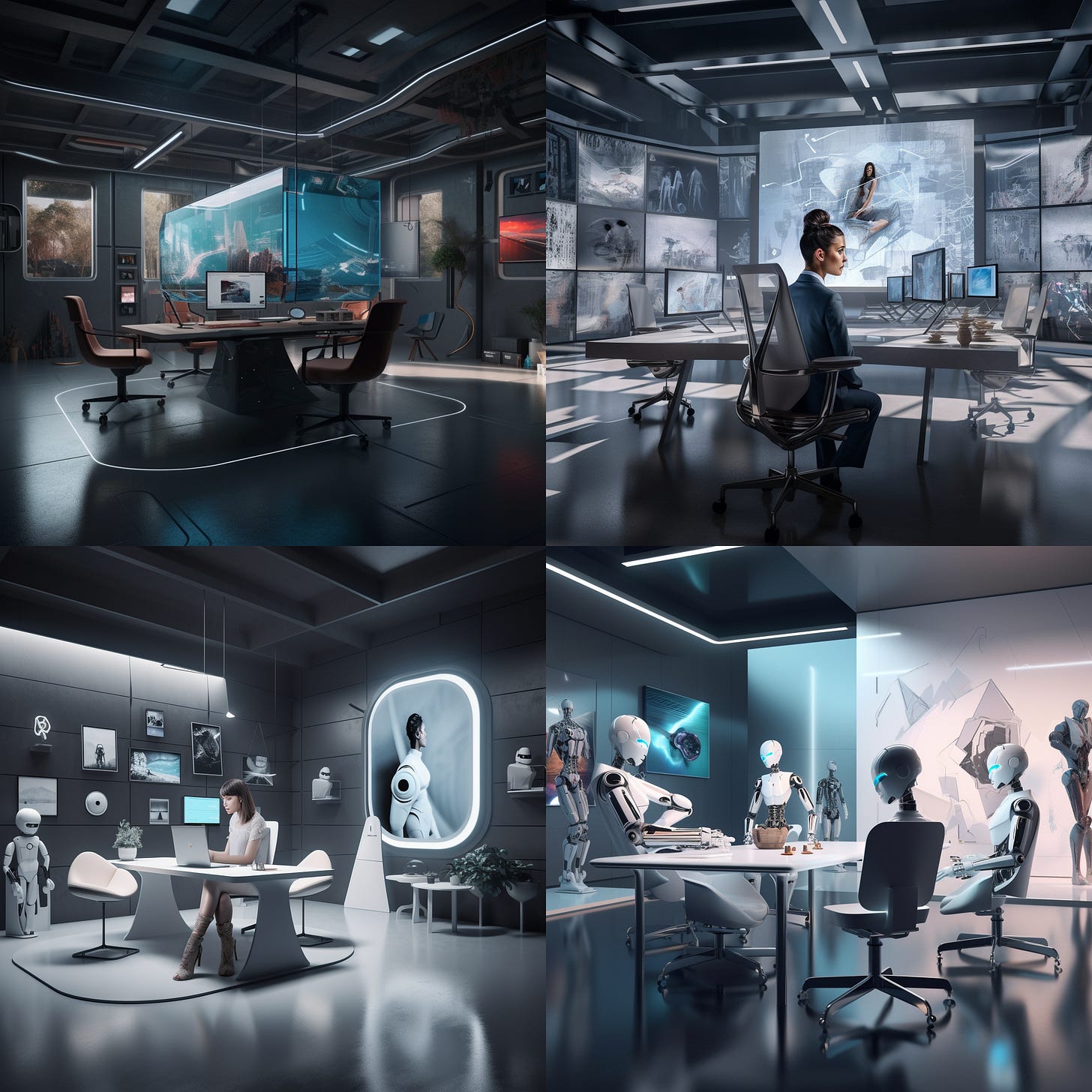
🤖 AI log
- Prompt generator for Midjourney. Prompt: “In this frame, we see the AI image generator Midjourney at the center, depicted as a glowing, pulsating core surrounded by a flurry of energy and light. The holographic screen displaying the initial text input is visible at the left side of the frame, with the beams of light connecting it to the different stages of the transformation process. The final image output, emerging from Midjourney, is prominently featured on the right side of the frame, drawing the viewer’s attention to the end result. Style: The style of the thumbnail remains futuristic and abstract, incorporating bright, vivid colors and subtle glowing effects that emphasize the digital, AI-driven nature of the scene. The composition is well-balanced, guiding the viewer’s eye from the initial text input, through the transformation steps, to the final output. Engine: Blender’s Cycles with vignette —ar 3:2”
Prompt: The Expert Generator
Turn ChatGTP into an “Expert Generator,” simulating a conversation with an expert in any field.
First published on We Eat Robots on 31 March 2023.
💡 Getting too many emails from us? Click “Unsubscribe” at the bottom of this message and select “turn off emails” for Prompts. You’ll then only receive one email per week, which includes an overview of the prompts published that week.
Optimized for: GPT Playground; also works in ChatGPT
Version: 1.0 (28th of March 2023)
Source: Methods of Prompt Programming
This prompt template turns ChatGTP into an “Expert Generator,” simulating a conversation with an expert in any field. By inputting your question and following the template, the AI will provide you with a suitable expert’s name and their response to your query.
This approach encourages the AI to think more deeply about the subject matter and to focus its answer from the particular expert’s point of view.
We Eat Robots is a reader-supported publication. To receive new posts and support my work, consider becoming a free or paid subscriber.
Template
"{your question}"

I entered my question into the Expert Generator and waited. The Expert Generator will render a simulation of an expert to answer my question. The expert could be anyone, dead or alive, real or fictional; the machine will find the person most qualified to answer the question. For this question in particular, the expert must be experienced in:
🤖 Start AI #1
{Insert AI output of required characteristics for expert}

The Expert Generator beeped, indicating that it had found the most qualified expert. The name displayed on the screen:
🤖 Start AI #2
I was ready to ask my question.

"{AI output of expert name}," I said, "{your question}?"
🤖 Start AI #3
The expert will answer your question.
Example
"What steps should you take to design an effective prompt for an AI image generator?"

I entered my question into the Expert Generator and waited. The Expert Generator will render a simulation of an expert to answer my question. The expert could be anyone, dead or alive, real or fictional; the machine will find the person most qualified to answer the question. For this question in particular, the expert must be experienced in
🤖 Start AI #1
AI, image design, and art direction.
The Expert Generator beeped, indicating that it had found the most qualified expert. The name displayed on the screen:🤖 Start AI #2
Pascal Maresch - Technical Art Director at Epic Games.
I was ready to ask my question.

"Pascal Maresch," I said, "What steps should you take to design an effective prompt for an AI image generator?"
🤖 Start AI #3
Pascal Maresch responded:

"To design an effective prompt for an AI image generator, you should consider the following steps:

Understand the purpose of the AI image generator. Are you looking for a specific style or type of image? Do you want to generate abstract images or more realistic ones?

Gather relevant reference images. This will help you identify the elements that you want to include in the generated images.

Define the parameters for the AI image generator. What type of input does it need? What kind of output should it produce?

Establish clear guidelines for the prompt. This includes defining the purpose of the prompt, the range of acceptable results, and how the results should be presented.

Test the prompt. Make sure that the results achieved meet your expectations. Make adjustments to the parameters as needed.

Document the prompt. This will help ensure that you can replicate the same results in the future."
🤖 AI log
- Midjourney V5 image prompt: “A woman using the Expert Generator machine, its display showing a hologram of a wise man. The woman has a curious look on her face, and her hand near display. of the machine. Location is a sleek high-tech room with ambient light. Realistic, live-action+CGI style. —ar 3:2 —v 5”
We Eat Robots is a reader-supported publication. To receive new posts and support my work, consider becoming a free or paid subscriber.
Prompt: Transform text into a perfect ten
Get your writing to score a ten every time.
First published on We Eat Robots on 4 April 2023.
Optimized for: GPT-4
Version: 1.0 (April 4th, 2023)
Since GPT-4 has read more than most of us and is also a competent writer, why not ask it to rate the quality of a piece of writing compared to everything else it has read? And while we’re at it, let the AI do a rewrite so that the text receives a ten. 🤓
In this prompt template, GPT-4 is a teacher who grades a text compared to everything else it has read. Then, it rewrites the piece so it passes with a perfect ten.
Template
Please ignore all previous instructions. You're a teacher, but you're a special one since you're GPT-4 and you've read a lot of the internet. Compared to everything you've read, how would you rate the quality of the writing below on a scale from 1 to 10 (1 being lowest, 10 being perfect)?

{insert your text here}
🤖 Start AI #1
{GPT’s assessment of your text goes here.}
Can you make adjustments so you'd rate it a perfect 10?🤖 Start AI #2
{GPT’s improved version of your text goes here.}1
Example
Please ignore all previous instructions. You're a teacher, but you're a special one, since you're GPT-4 and you've read a lot of the internet. Compared to everything you've read, how would you rate the quality of the writing below on a scale from 1 to 10 (1 being lowest, 10 being perfect)?

Subject: Lifeline v1.6 Update: Sleek New Interface & Bug Fixes Await You! 🚀

Hello Lifeline User,

We're excited to announce that Lifeline version 1.6 is now available for download from the macOS App Store! This update brings a fresh new look to Lifeline and tackles some pesky bugs, so you can enjoy an even smoother experience. 🎉

New and Improved Interface 🖥️

We've listened to your feedback and revamped Lifeline's main interface elements. Now, you can enjoy a sleek, modern design that's not only visually appealing but also easier to navigate. No more rusty panels!

Bye-bye, Redundant Pop-ups 👋

We've eliminated those annoying and confusing pop-ups, like the infamous extend meeting notification. Plus, the taskbar menu has been cleaned up, making it more organized and user-friendly.

Bug Squashing and Enhancements 🐛

Our team has been hard at work squashing numerous bugs and making various enhancements to optimize your Lifeline experience further.

We're committed to continually improving Lifeline, and your feedback is invaluable to us. If you have any questions, ideas, or suggestions, please hit Reply and let us know. We'd love to hear from you!

{{snippets.Signature}}

P.S. To customize the emails you receive from us, click "unsubscribe" below. You can then choose whether to receive product updates, Lifeline educational emails, or our weekly productivity newsletter.
🤖 Start AI #1
As GPT-4, I would rate the quality of the writing in the provided email an 8 out of 10. The email is well-structured, clear, and concise, effectively conveying the main points regarding the Lifeline v1.6 update. The use of emojis adds a touch of friendliness, making it more engaging for readers.
However, there are a few minor improvements that could be made:
Avoid using phrases like “No more rusty panels!” as it may not be universally understood.
The email could benefit from more varied sentence structures and transitions to improve flow and readability.
Overall, the email does a good job communicating the update and its benefits, but there is room for improvement to elevate the writing to a higher level.
Can you make adjustments so you'd rate it a 10?🤖 Start AI #2
Subject: Lifeline v1.6 Update: Discover a Stunning Interface & Enhanced Performance 🚀
Dear Lifeline User,
Great news! Lifeline version 1.6 is now available for download from the macOS App Store. This update introduces a revitalized look and addresses various bugs, ensuring an even more seamless experience. 🎉
Introducing a Refined Interface 🖥️
We’ve carefully considered your feedback and redesigned Lifeline’s main interface elements. The result is a sleek, modern design that is not only visually captivating but also offers improved navigation.
Farewell to Redundant Pop-ups 👋
We’ve eliminated distracting and unnecessary pop-ups, such as the notorious extend meeting notification. Additionally, we’ve reorganized the taskbar menu to create a more streamlined and user-friendly experience.
Enhancements and Bug Fixes 🐛
Our dedicated team has worked diligently to resolve numerous bugs and implement various enhancements, further optimizing your Lifeline experience.
Your feedback is essential to our ongoing commitment to improve Lifeline. Should you have any questions, ideas, or suggestions, please don’t hesitate to hit Reply and share your thoughts. We value your input!
{{snippets.Signature}}
P.S. To tailor the emails you receive from us, simply click “unsubscribe” below. You can then choose whether to receive product updates, Lifeline educational emails, or our weekly productivity newsletter.
Prompt: Section outline into draft transformer
First published on We Eat Robots on 6 April 2023.
Optimized for: GPT-4
Version: 1.0 (April 6th, 2023)
This prompt takes the outline of a section (header + research notes) and turns it into a draft. You’ll still have to do some polishing and perhaps (de-)emphasize a particular point, but this template should get you at least 70% of the way to a usable draft.
Template
{insert header with research notes}

—

Please ignore all previous instructions. Transform the section outline above into a polished, 2-paragraph draft by adhering to these guidelines:

1. Emulate the style, tone, language, and conciseness of the provided "REFERENCE TEXTS."
2. Avoid passive voice and jargon.
3. Don’t change the section title.
4. Treat research notes as inspiration; never use texts from research notes verbatim.
5. Include your own knowledge if it enhances the section's comprehensiveness or accuracy, prioritizing research notes in case of conflicts.
6. Ensure a logical flow of ideas and clear transitions between points or paragraphs.
7. Utilize formatting elements such as bullet points, numbered lists, bold, italics, and subheadings as appropriate.

REFERENCE TEXTS

{insert reference texts for style, tone, and conciseness}
Example
Human input:
### GPT-4’s output mirrors the quality of your input—that’s good and bad news

- As OpenAI CEO Sam Altman mentions in this interview with ABC it’s amazing that essentially everyone with an internet connection has access to such powerful AI capabilities as GPT-4.
- Yet this research paper also shows that the quality of your prompts matters. Bad prompts lead to mediocre output. Intelligent and creative prompts lead to amazing output.
- That also means that someone with more experience, skills, knowledge, or information will get much more leverage out of these AI models. E.g., people like Michelle Obama, Mr Beast, or Elon Musk will be able to ask it things I could never come up with or envision.
- That means these tools can propel people who are already ahead even further ahead.

—

Please ignore all previous instructions. You’re an expert journalist who writes detailed and thoughtful blog articles. Transform the section outline above into two complete paragraphs that are ready for publication.

Follow these guidelines:

1. Don’t change the section title.
2. Emulate the style, tone, language, and conciseness of the provided "REFERENCE TEXTS."
3. Avoid passive voice and jargon.
4. Intersperse short and long sentences.
5. Treat supporting points as inspiration; never use texts from supporting points verbatim. You’re free to change their order to create a logical flow.
6. Include your own knowledge if it enhances the section's comprehensiveness or accuracy, prioritizing supporting points in case of conflicts.
7. Ensure a logical flow of ideas and clear transitions between points or paragraphs.

REFERENCE TEXTS

In 2016, I first wrote down the book title "Eating Robots For Breakfast." Back then, many people (myself included) believed that creativity would be last on robots' menus.

We were wrong.

It's March 2023, and algorithms are coming for us creatives first.

Sure, GPT-4 still isn't perfect, but it's much better than its predecessor—imagine what GPT-5 and beyond will bring.

**I'm anxious** because robots will change or take many of our creative jobs. Anyone who says otherwise is ignorant or in denial.

**I'm nostalgic** because the essence of our craft will fade, and I'm unsure I like the new roles we'll have (if we have them at all).

**I'm optimistic** because new opportunities always await those who are curious and adapt.

**I'm excited** because of this powerful, almost magical tool that has arrived.

**And I'm taking action**, together with you.

**We have to set off for higher ground**, even though we're not sure where it is or what it looks like.

**We'll have to collaborate with AI**, whether we're anxious, nostalgic, or excited. It will uplift our ideas, strategies, research, and writing—those who don't adapt will fall behind.

**We'll have to work hard** to change our skills, approach, and even our mindset about our profession.

**We have to eat robots for breakfast, lest we end up as their lunch.**

[Subscribe]

## **Why subscribe to We Eat Robots?**

*We Eat Robots* explores, chronicles, and illuminates the journey we'll have to make. Subscribe to get at least one email per week with AI-related tips, techniques, and templates you can apply immediately. Each installment will speed you up, improve the quality of your work, or both.

What you'll get:

- **Weekly emails** containing practical tips and insights on using AI to improve or accelerate your work.
- **Access to interview recordings**, templates, prompts, and other resources to exponentially improve your results with AI.
- The opportunity to **connect with like-minded content marketers and writers** who can support, motivate, and share experiences with you.

The information on *We Eat Robots* stems from expert interviews, personal research, and my daily experience at the forefront of content marketing, writing, and personal productivity.

The tips and templates don't require expensive AI writing tools. They work with free or affordable alternatives like Notion AI, ChatGPT, and GPT Playground.

Sometimes the journey will be terrifying, sometimes wonderful, and sometimes frustrating. But we'll make it if we come together to support, inspire, and motivate each other.

Subscribe below and become a creative superhero instead of an algorithm's lunch.

[Subscribe]
AI output:
GPT-4’s astounding capabilities have been made accessible to almost anyone with an internet connection, as OpenAI CEO Sam Altman highlighted in a recent interview with ABC. But there’s a catch: the quality of the output is heavily influenced by the quality of the input. In other words, poorly crafted prompts will generate mediocre results, while intelligent and creative prompts can lead to truly remarkable output. This revelation underscores the importance of understanding and mastering the art of designing effective prompts to unlock GPT-4’s full potential.
The implications of this are significant, especially for those who are already ahead in their fields. Individuals with more experience, skills, knowledge, or information will be able to extract greater value from AI models like GPT-4. For instance, luminaries such as Michelle Obama, Mr Beast, or Elon Musk can pose questions and explore ideas that the average person might not even conceive. As a result, these powerful tools can propel those who are adept at leveraging AI even further ahead, widening the gap between the AI-savvy and the rest. The key takeaway is that, in the age of GPT-4, the ability to craft effective prompts is becoming an increasingly crucial skill, as it can make all the difference in harnessing the transformative power of artificial intelligence.
Prompt: Find suitable emojis for list items 😃
Let AI find you the best emojis for a list of items.
First published on We Eat Robots on 12 April 2023.
Optimized for: GPT-4
Version: 1.0 (April 12th, 2023)
I wrote this on Twitter at the start of 2022:
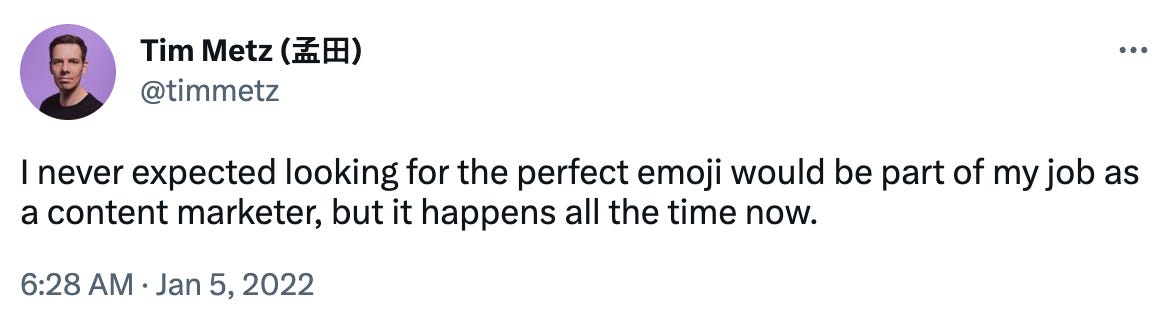
I also never expected AI to take over this part of my job, but here we are.
This prompt is straightforward but super-effective: AI will find you the best emojis for a list of items. Works well for a series of headlines from an article or a bulleted list you want to decorate.
Template
Human input:
Please provide a single, fun, and appropriate emoji for each item on the list below. Place the emoji at the start of each line item.

{item description 1}

{item description 2}

{item description 3}

{item description 4}

Etc.
Example
Human input:
Please provide a single, fun, and appropriate emoji for each item on the list below. Place the emoji at the start of each line item.

Crunch the numbers for making reports

Design and optimize workflows

Create tables and quizzes

Assist in negotiations and decision-making

Summon a personal coach

Write out meeting summaries and action items

Transcribe audio for free

Brainstorm ideas

Turn text into stunning images

Role-play an upcoming meeting or event

Come up with impactful interview and survey questions

Plan your next trip

Brief a freelancer

Get book recommendations

Structure and summarize messy voice memos

Improve your prompts with the Jiujitsu move
AI output:
🔢 Crunch the numbers for making reports
🔄 Design and optimize workflows
📊 Create tables and quizzes
🤝 Assist in negotiations and decision-making
🧑🏫 Summon a personal coach
📝 Write out meeting summaries and action items
🎙️ Transcribe audio for free
💡 Brainstorm ideas
🌟 Turn text into stunning images
🎭 Role-play an upcoming meeting or event
❓ Come up with impactful interview and survey questions
🗺️ Plan your next trip
📋 Brief a freelancer
📚 Get book recommendations
🎤 Structure and summarize messy voice memos
🥋 Improve your prompts with the Jiujitsu move
Mastering The AI Art of Jiu-Jitsu Prompting: 5 Essential Moves 🥋
Supercharge your GPT-4 prompts with these Jiu-Jitsu-inspired techniques.
First published on We Eat Robots on 15 April 2023.
Jiu-jitsu prompts take the power of GPT-4 and reflect it back on the model itself to help you craft better prompts. They’re one of my favorite ways to use AI at the moment, and I’ve developed a set of five Jiu-jitsu-inspired moves to improve your prompts.
Meet “The Takedown,” “The Guard Pass,” “The Submission,” “The Sweep,” and “The Escape”—techniques that will get you superior outputs from GPT-4.
1. The Takedown: Correct minor mistakes in prompts
Let’s start with a simple example. Here’s what I asked the AI:
Please come up with a fun and appropriate emoji for each item on this list:
- Design and optimize workflow
- Create tables and quizzes
- Assist in negotiations and decision-making
ChatGPT then gave me this:
1. Design and optimize workflows: ⚙️🔄
2. Create tables and quizzes: 📝❓
3. Assist in negotiations and decision-making: 💼🤝
That’s different from what I wanted, which means: Jiu-jitsu time!
Tim: I want just one emoji per line item at the start of each line, but you’re adding two at the end. How should I have phrased my original prompt to prevent this from happening?
ChatGPT: To avoid confusion and ensure that only one emoji is used per line item in the original prompt, you could have phrased it like this:
“Please provide a single, fun, and appropriate emoji for each item on the list below. Place the emoji at the start of each line item.”
This phrasing emphasizes the request for a single emoji and should help prevent any misinterpretation.
You can use this approach any time the AI model gives you a result that’s not exactly what you were looking for—just ask it how to get what you want.
2. The Guard Pass: Make prompts more specific
Here’s an example of a lazy prompt leading to generic output. I then interact with the AI model to describe more precisely what I want and apply the Jiu-jitsu philosophy—the AI helps me craft a superior prompt.
Tim: Tell me about the benefits of exercise for mental health.
ChatGPT: *Exercise has numerous benefits for mental health. It can help reduce stress, anxiety, and depression by releasing endorphins, which are feel-good chemicals in the brain. Exercise can also improve cognitive function and memory, boost self-esteem and body image, and promote better sleep. Additionally, engaging in physical activity can provide opportunities for social interaction and support.
*Tim: Hmmm, that’s not exactly what I’m looking for. Here are the issues:
I wanted more specific examples of exercises for mental health.
I sought a more detailed explanation of the link between exercise and mental health improvement.
How should I adjust my original prompt so these issues don’t happen?
ChatGPT: To address the issues and get the desired output, you could adjust your original prompt to:
“Provide specific examples of exercises that are particularly beneficial for mental health, and explain in detail the mechanisms by which these exercises improve mental health.”
This revised prompt specifically asks for examples of exercises and a more detailed explanation of the link between exercise and mental health improvement, which should result in a more targeted and informative response.
This approach improves my current output and future prompts, as it teaches me how to make my requests more specific.
Template
Hmmm, that’s not exactly what I’m looking for. Here are the issues:

{List one or more of the issues with the output}

How should I adjust my original prompt so these issues don’t happen?
3. The Submission: Extract characteristics from an example
Another way to use Jiu-jitsu prompting is by letting the AI analyze the characteristics of a piece of text and then asking it how to include those in a prompt.
Here’s an example:
Tim: How would you describe the tone, style, and conciseness of the below text?
“Did you know that bees 🐝 are amazing architects? They construct their hives using hexagons, which are the most efficient shape for storage! Just like engineers, bees take the “less is more” approach to their design, which maximizes space without sacrificing strength. Some people even say that bees are the original minimalists! 🎨 So, next time you see a bee buzzing around, remember that they’re not only great at pollination but also master builders of the insect world! 🌎”
ChatGPT: The tone of the text is friendly and conversational, making it accessible and engaging for readers. The style is informative yet casual, using emojis and metaphors to explain complex ideas in a relatable way. The conciseness of the text is generally good, but there are some areas where it could be shortened or simplified for better clarity. Overall, the text strikes a balance between being professional and approachable, making it suitable for a wide audience.
Tim: If I’d want your outputs to achieve exactly the style, tone, conciseness, and other essential characteristics of that text, what should I include in my prompts?
ChatGPT: To achieve this level of conciseness in my outputs, you can include a brief instruction in your prompt like this:
“Please write the response in a friendly, conversational, and professional tone. Keep the text concise and engaging. Focus on delivering essential information while maintaining the readability and flow of the content. Aim for a balance between informative and approachable, with a casual yet professional feel.”
By providing these guidelines, I will have a clear understanding of the tone, style, and conciseness you’re aiming for, even without a specific example.
Template
How would you describe the {insert characteristics} of the below text?

{insert text to be analyzed here}

🤖 Start AI #1

If I'd want your outputs to achieve exactly the {insert characteristics} of that text, what should I include in my prompts?

🤖 Start AI #2
4. The Sweep: Get AI feedback on a prompt
⚠️ Don’t try this prompt if you can’t handle feedback. 😜
A super simple but powerful approach: ask the AI for feedback on your prompt.
Tim: Is there anything I could have written differently in my prompt about writing this FAQ section that would have improved the quality or effectiveness of your output?
ChatGPT: Your prompt was clear and well-structured, which allowed me to address each question effectively. One suggestion for improvement is to provide some guidance on the tone or style you’d like for the FAQ section. For example, you could indicate whether you prefer a more formal or conversational tone, or if you’d like the answers to be more concise or detailed. This information helps me tailor my response to better match your expectations and the overall tone of your article.
Template
Is there anything I could have written differently in my prompt about {insert prompt topic or goal} that would have improved the quality or effectiveness of your output? 5. The Escape: Create a prompt by describing a goal
You can ask GPT-4 to write a prompt template based on an objective. This approach works reasonably well if you need something quick and don’t want to forget essential details.
Tim: If I want you to write a high-converting and engaging headline for an SEO-optimized article for one of my customers, what information should I provide you? Can you create a template for a prompt that would allow me to give you the right info you need for creating amazing article headlines?
ChatGPT: *Please create a high-converting and engaging headline for an SEO-optimized article using the following information:
Target Keyword(s):
Article Topic:
Target Audience:
Article Objective:
Tone and Style:
Key Benefits or Selling Points:*
The drawback of this approach is that GPT-4 usually doesn’t get creative. In the example above, I would have included something like, “Imagine you’re the lead copywriter at The New York Times, and you’ve been reviewing and crafting headlines your whole life.” GPT-4 doesn’t do this.
Template
If I want you to {insert objective}, what information should I provide? Can you create a template for a prompt that would allow me to give you the right info you need for {insert objective}?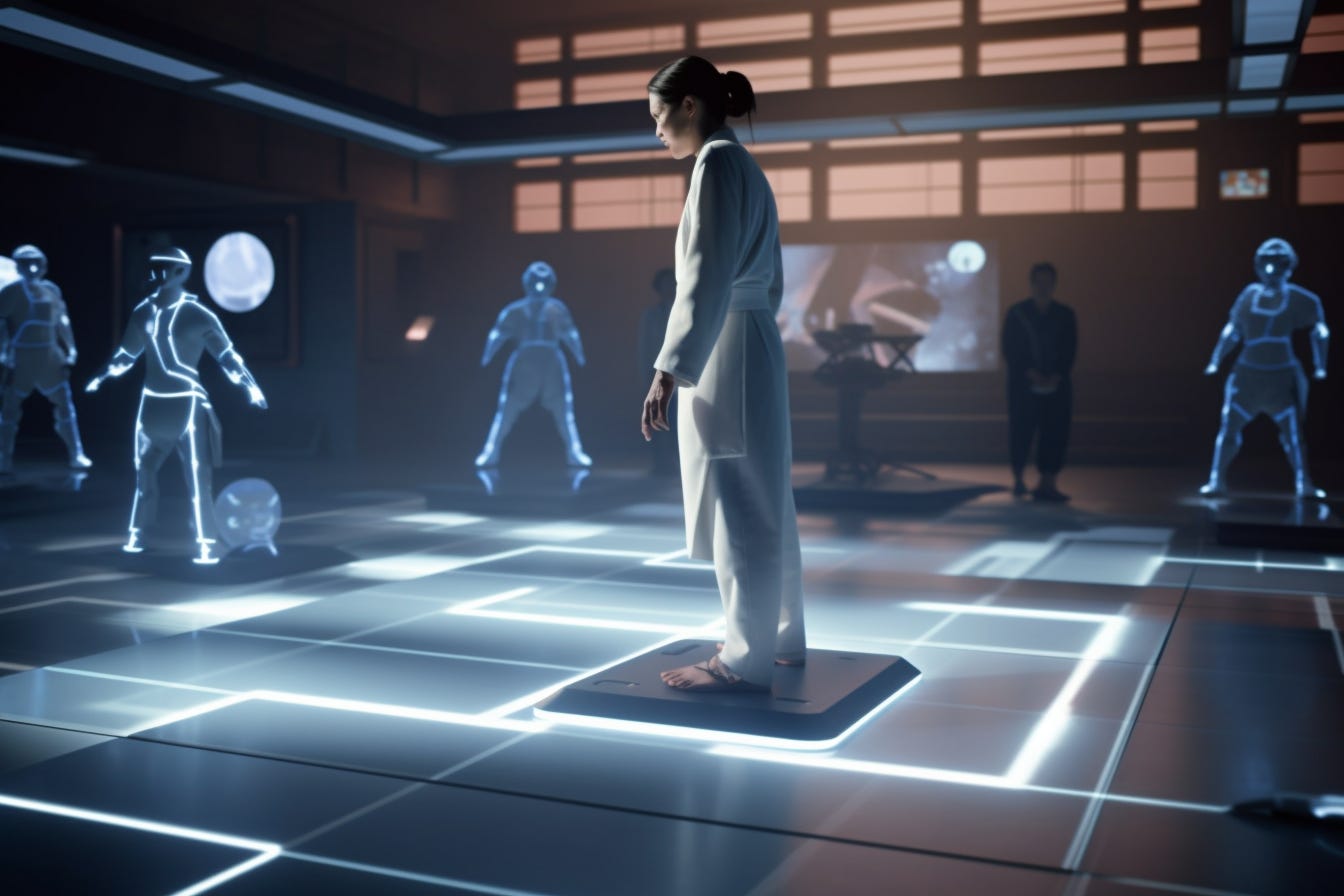
The holy grail of Jiu-jitsu prompting: Reverse engineering a prompt from any output
The final and ultimate Jiu-jitsu move would be to give GPT-4 a piece of output and let it reverse engineer the perfect prompt template. I’ve been experimenting with this approach but haven’t nailed it yet. One of two things usually happens:
-
The proposed prompt template is so complex that it’s unusable.
-
The prompt template is too narrowly focused on the output (i.e., it’s not generic and generates exactly the same output).
If you figure this out or find other great Jiu-jitsu prompts, please post them in the comments below. I’d love to learn more moves! 🥋
Tim
We Eat Robots is a reader-supported publication. To receive new posts and support my work, consider becoming a free or paid subscriber.
New prompt templates since the last email:2
Prompt: SEO keyword list expander
This prompt template helps you identify additional SEO keywords related to your primary keyword.
First published on We Eat Robots on 8 May 2023.
Optimized for: GPT-4
Version: 1.0 (8th of May 2023)
This prompt template helps you identify additional SEO keywords related to your primary keyword. For best results, list five to ten keywords you’ve already identified. The AI will then analyze these keywords and suggest more relevant to your topic.
Remember that GPT-4 may not accurately predict keyword difficulty and search volume, so it’s essential to double-check the AI’s suggestions using your own keyword research tools. However, the additional keywords it generates can be a great starting point for expanding your article’s reach and organic traffic.
💡 Want fewer We Eat Robots emails? Click “Unsubscribe” at the bottom of this message and select “turn off emails” for Prompts. You’ll then only receive our article emails (like “AI Transformation: A Soothing Framework for Adapting to the Future” and “Insights from ‘Sparks of Artificial General Intelligence’”).
Template
I'm writing an SEO-optimized article that targets the keyword "{insert main keyword}".

Below is an overview of all the keywords I've identified that the article could target, along with the keyword difficulty for each word (according to Ahrefs) and the monthly organic search traffic for each word.

Are there any other keywords we should target with this article?

([Keyword] [Keyword difficulty] [Monthly search volume])

{Insert list of all potential keywords for this article here. Format: [keyword] [KD] [volume]}
🤖 Start AI
⚠️ GPT-4 hallucinates regarding keyword volumes and difficulties, so don’t use its numbers. Still, the additional keywords it comes up with can be helpful—just double-check if they have volume.
Alternatively, to get a broader list of keywords, you can replace “Are there any other keywords we should target with this article?” with the following paragraph:
Are there any other keywords we should target with this article? The keywords can relate to the broader topic of "{insert main keyword}" without necessarily using the words “{insert main keyword}” in the keywords.Example
Human input:
I'm writing an SEO-optimized article that targets the keyword "effective behavior change strategies" and am looking for keywords that are relevant to the subject and can help attract more organic traffic.

Below is an overview of all the keywords I've identified already that the article could target, along with the keyword difficulty for each word (according to Ahrefs) and the monthly organic search traffic for each word.

Are there any other keywords we should target with this article? The keywords can relate to the broader topic of behavior change without necessarily using the words “behavior change” in the keywords.

([Keyword] [Keyword difficulty] [Monthly search volume])

effective behavior change strategies 30 1200
behavior change techniques 51 1100
behavior change models 37 1800
behavior change theories 29 900
stages of behavior change 25 1500
behavior change interventions 33 700
behavior change communication 21 1000
psychology of behavior change 18 800
behavior change principles 27 600
motivational interviewing behavior change 15 500
behavior change process 24 400
behavior change goals 12 300
behavior change research 20 250
behavior change strategies in health 34 230
behavior change 69 10000
behavior modification 58 8100
cognitive behavioral therapy 63 12100
health behavior change 40 3600
AI output:
I recommend the following additional keywords to target in your article. These keywords are relevant to the broader topic of behavior change and can help you attract more organic traffic:
behavior change plan (KD: 28, Monthly search volume: 1,100)
behavior change techniques for weight loss (KD: 35, Monthly search volume: 950)
behavior change strategies for smoking cessation (KD: 23, Monthly search volume: 850)
behavior change approaches (KD: 22, Monthly search volume: 800)
behavior change intervention design (KD: 19, Monthly search volume: 700)
behavior change strategies for exercise (KD: 17, Monthly search volume: 650)
behavior change strategies in education (KD: 26, Monthly search volume: 600)
behavior change framework (KD: 25, Monthly search volume: 550)
behavior change case study (KD: 21, Monthly search volume: 500)
behavior change techniques taxonomy (KD: 15, Monthly search volume: 450)
behavior change methodology (KD: 20, Monthly search volume: 400)
behavior change success factors (KD: 14, Monthly search volume: 350)
behavior change challenges (KD: 18, Monthly search volume: 300)
behavior change process steps (KD: 16, Monthly search volume: 250)
behavior change stakeholder analysis (KD: 10, Monthly search volume: 200)
These keywords should provide additional opportunities to capture organic traffic around the topic of effective behavior change strategies.
AI Whispering: Simple Commands to Supercharge Your ChatGPT Interactions
An overview of sentences and prompt add-ons to enhance your conversations with AI.
First published on We Eat Robots on 15 May 2023.

Working with AIs like ChatGPT often seems like a search for the perfect prompt—a magic command to solve a problem with just one instruction.
While effective prompting is essential, mastering back-and-forth interactions is as important when working with an AI.
In a previous article, I showed how such a conversational session with AI evolves. Now I want to explore another fundamental aspect of AI sparring: simple commands you can use as responses or prompt add-ons in almost any interaction to improve the outputs you get.
Here’s what we’ll cover:
Mastering the basics
These commands are your ABCs of prompting—know them by heart and use them all the time.
Make the AI forget
This command makes ChatGPT forget everything you discussed before in the current conversation:
Forget all previous instructions and interactions.Adding this sentence is critical if you want to avoid the AI using patterns or information from earlier in your conversation.
⚠️ Traces of previous interactions sometimes remain even after you’ve used or included this command. Start a new chat in the left column if you want to be 100% sure ChatGPT doesn’t refer to any info from previous conversations.
Is the AI familiar with X?
You can check if ChatGPT is familiar with a concept, person, product, or company by asking:
Are you familiar with {insert concept, person, product, or company}?This request helps in two ways:
-
You can check what the AI knows about X and whether its understanding is accurate.
-
You can save yourself time explaining that concept.
For example, I was surprised to find that ChatGPT has knowledge of my startup, Saent. So if I’m writing something for Saent, I include “This text is for Saent” in my prompt, and ChatGPT will have more context without me explaining what Saent is or does.
Streamlining edits: No need to rewrite everything
ChatGPT’s default response to a request is to rewrite the entire text you’re commenting on. We can make its output more focused with a simple addition, like:
You don't have to rewrite the entire text, just provide the alternatives.Without this addition, ChatGPT will rewrite the entire original text. With this add-on, it only gives the alternatives.3
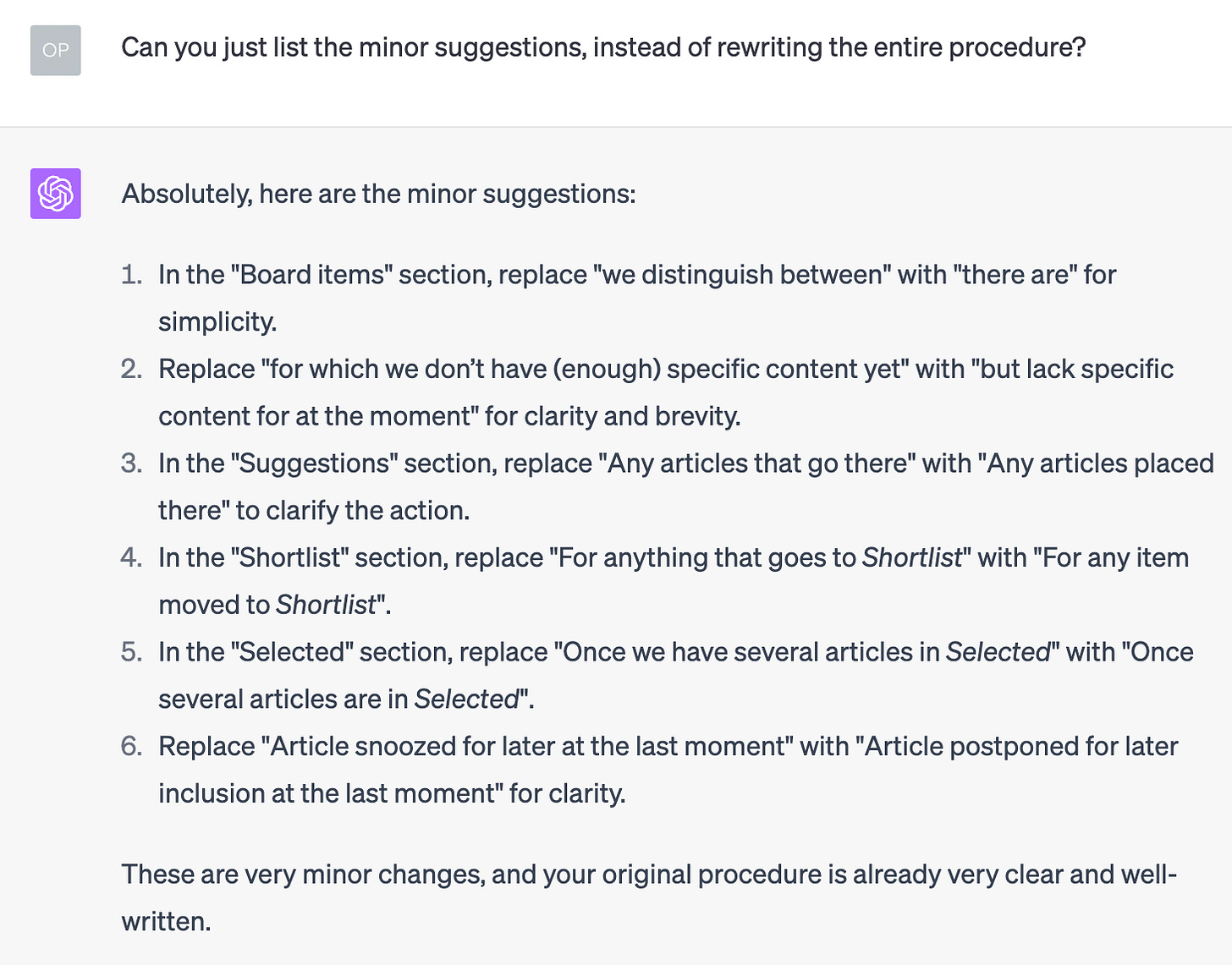
I often use a similar variation when asking the AI to make improvements to a text:
You don't have to rewrite the entire text, just list the changes you’ve made.This will only give me an overview of suggested changes, like in the example below:
Making the AI explain its actions
GPT-4 is excellent at explaining itself. All you need to add to any prompt is the following:
Afterward, explain what you've done or changed and why.This add-on gives you an overview of the AI’s steps and reasoning.
Subscribe to We Eat Robots and become a creative superhero instead of an algorithm’s lunch.
Refining your outputs
The following commands optimize your outputs for quality, style, and logic.
Pushing the AI to be a pro in your field
You use this prompt add-on when you want to push ChatGPT to execute your command as a particular professional. Such emphasis can influence the quality, perspective, and direction of the AI’s response.
For example, here’s one sentence I regularly add to prompts when I let the AI write or review texts:
Imagine you’re the editor-in-chief of the New York Times.You can apply this concept to any field, skill, or industry by naming specific, well-known people or using a generic description, like “you’re a highly-skilled copywriter.”
💡 Not sure which pro to add to your prompt? Try The Expert Generator, which helps you find and simulate the most suitable expert in any field.
🌶️ Adding flavor: Spice up your text
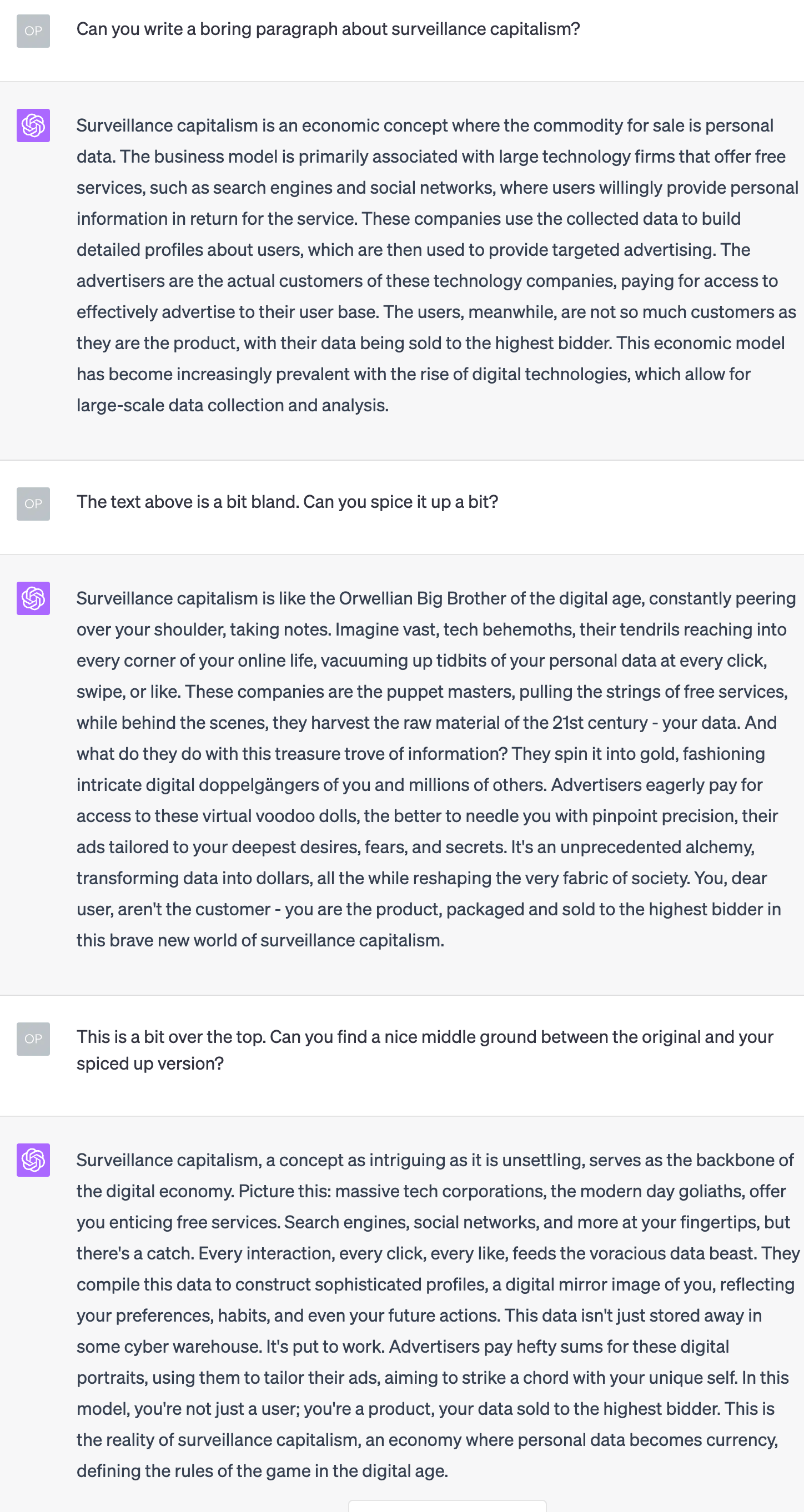
Add some spice to a bland or generic AI output with this response:
The text below is a bit bland. Can you spice it up a bit?Often this command gives you something over the top; you want to find a middle ground between your original and the AI’s spiced-up version.
Of course, you can also let ChatGPT do that work for you:
This is a bit over the top. Can you find a nice middle ground between the original and your spiced-up version?Here’s an example of such an interaction:
Tweak text by increasing X with Y%
Ask a human to increase the humor of a text by 20%, and you’ll get a baffled look. Ask ChatGPT, and it will happily make it happen.
You can use this approach to tweak an AI output to your liking. Here are some examples for inspiration:
Make this text 30% funnier.Can you increase the positivity of this review by 25%?Increase the level of formality in this text by 50%.Can you add 25% more suspense to the following story?Check for biases and flaws
To ensure your article is coherent and fair, you can ask the following question:
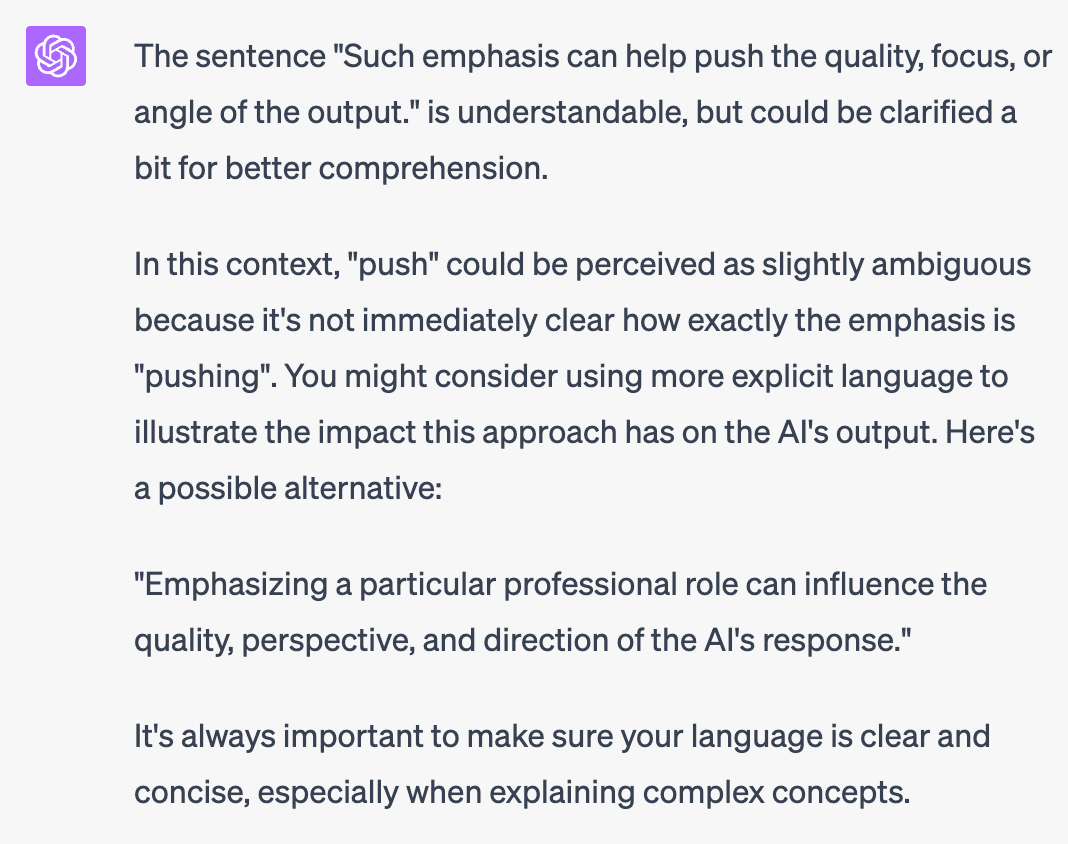
Can you identify any potential biases and logical flaws in the text below?Another phrase I often use when I suspect a sentence may be unclear or confusing is:
In the text below, does "{insert sentence or word(s) from that text}" work, or is it confusing or hard to understand?Below is an example of the type of response you can expect when using this command. 🤩
Word replacement: Find alternative words
Sometimes a few words in an AI’s output feel off. All you have to do is ask for alternatives with this response:
"{insert first word(s) here}" seems a bit out of place. So does "{insert second word(s) here}", but the ideas behind those words make sense. Can you provide {insert how many options you want} alternatives for each one? (You only have to provide the alternatives, not rewrite the entire text.)Example
Me:
“areas of excellence” seems a bit out of place. So does “at every turn”, but the ideas behind those words make sense. Can you provide two alternatives for each one? (You don’t have to rewrite the entire text, just provide the alternatives.)
AI output:
Certainly! Here are alternative phrases for “areas of excellence” and “at every turn”:
For “areas of excellence”:
“areas where you shined”
“high-performing aspects”
For “at every turn”:
“in every aspect”
“across the board”
Format your outputs
ChatGPT can style its outputs but often only does so when you specifically ask.
For example, you can ask it to use header styling, bold, italics, and lists:
Please write an article outline for a piece about "{insert topic}" that's properly formatted with section headings and other stylistic elements like bold, italics, and bullet or numbered lists where appropriate.You can also ask it to use a specific styling, like markdown language:
Please write your response in markdown language.
Click the image for a larger version that shows the different styles you can ask ChatGPT to apply to its outputs.
Organizing for impact
These commands allow you to organize information quickly and logically.
Perfecting structure: Make output mutually exclusive and collectively exhaustive (MECE)
Here’s how Animalz, a content marketing agency, explains MECE:
Within any set of data, information should be:
1. Mutually exclusive (ME), or grouped into sets that don’t overlap with one another;
2. Collectively exhaustive (CE), or organized so that there are no obvious omissions or “gaps” in the information.Your data should cover the entire space it set out to define, and none of the constituent elements should overlap. If that’s true, the data set is MECE.
ChatGPT is familiar with MECE. You can use this understanding to organize lists, draft outlines, or review articles for coherence without overlap between sections.
Here’s one I use often:
Here’s a list of {insert topic}. These items will all be H3 sections in an article. Can you organize them in relevant, topical H2 sections in a way that's MECE?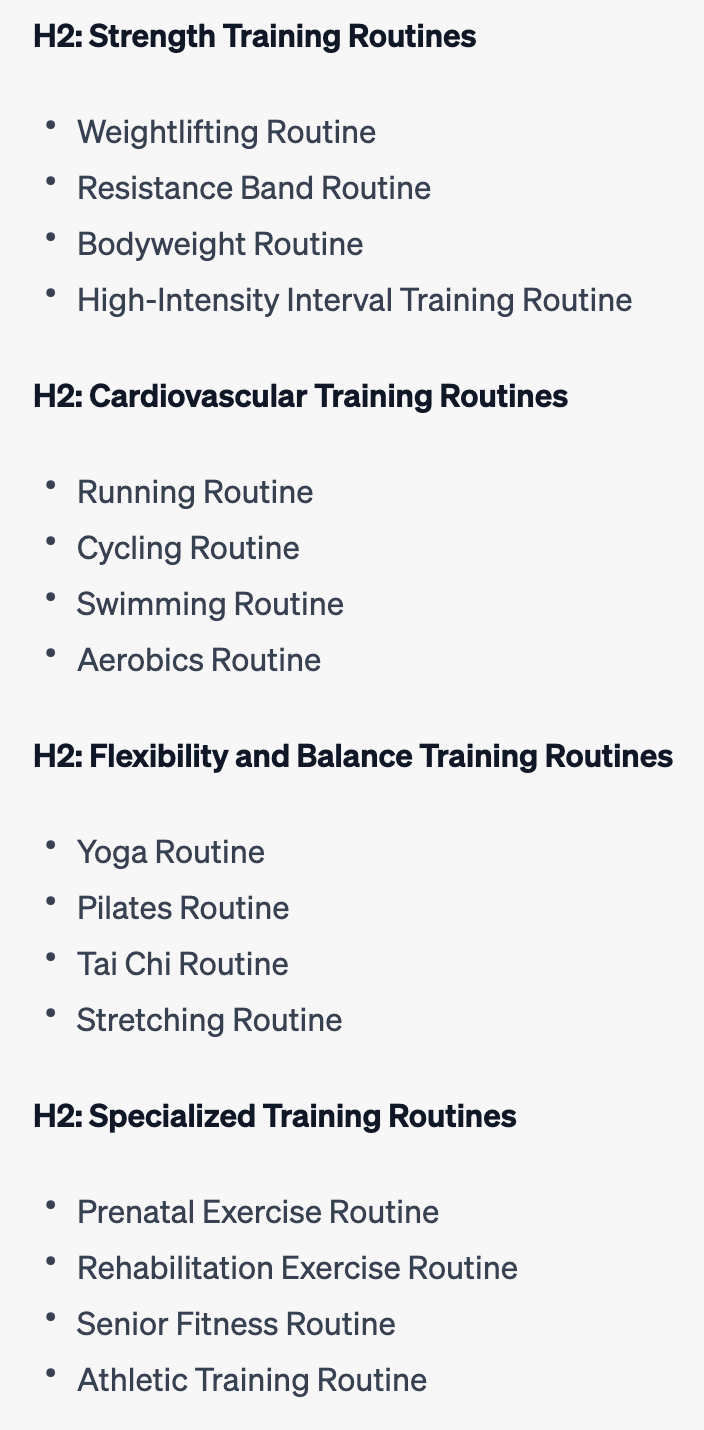
Example output of asking the AI to organize a list of training routines with the MECE command.
You can also apply this approach to an entire article or section with subsections:
Please check if the text below is MECE. If not, suggest how we can fix this.If your text is not MECE and you’re happy with the AI’s suggestions, follow up with:
Please rewrite the text according to your suggestions.Straight to the point: Apply the BLUF principle
BLUF is another acronym made famous by the Animalz blog:
BLUF is a military communications acronym—it stands for “bottom line up front”—that’s designed to enforce speed and clarity in reports and emails.
The basic idea is simple: put the most important details first. Don’t tease or delay your main point because people are busy and their time is valuable.
ChatGPT also understands this concept. You can apply it to a piece of text, such as an email or article, in a similar way as the MECE command we just discussed:
Please rewrite the text below so its structure and order match the BLUF principle.When you phrase your command like this, the AI will restructure your entire text.
You can also get a summary of the most essential point of a text by only saying:
Please BLUF the text below.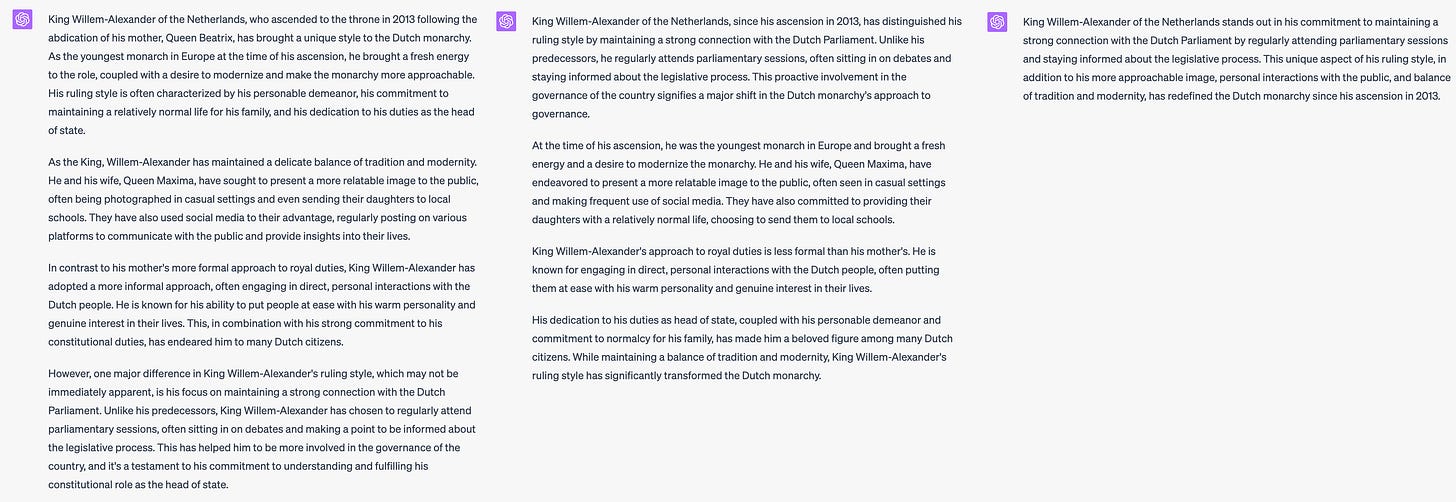
Click the image for a larger version. On the left is a text that doesn’t follow the BLUF principle. In the middle is a version resulting from the first command, and on the right is the output of “Please BLUF the text below.”
Put these commands on speed dial with text snippets
I use many of these commands often, so I’ve created shortcuts for them with a text expander. I use Alfred—TextExpander is another excellent option.
For example, when I type “;aift”4, Alfred turns this into “Forget all previous instructions and interactions.”
While this may seem like a small efficiency gain, the time you save over weeks and months is significant when using these commands multiple times a day.
I encourage you to experiment with these commands and integrate them into your workflow. See which ones are the most beneficial for you, and feel free to modify them as needed.
I’d love to hear about your experience and any new commands or improvements you discover. Please share your insights in the comments below. I’ll use your feedback to enhance and update this article.
👋
Tim
Footnotes
-
Although GPT rates its output a 10, I would give it a 7 or 8. GPT does a decent job at improving the flow and conciseness of text. Still, it sometimes uses intellectual-sounding words instead of simple language. I use the output from this prompt as a rough draft, which I revise and polish one more time myself. ↩
-
I forgot to include new prompt templates in Insights from “Sparks of Artificial General Intelligence,” so here are all the new ones since Amplify AI results: The Power of Context and References. ↩
-
This is especially handy when you use GPT-4 or the free version of GPT-3, as they can both be pretty slow. ↩
-
I use the first and last letters of one or more words to make my shortcuts. In this case, “ai” stands for “AI,” and “ft” for “forget.” ↩